Table of Contents
Carbide 3D Training SOP
Last edited: Furst (09/08/20)
Instructor:
Date:
| Name | Group or Company | Signature | |
|---|---|---|---|
| 1 | |||
| 2 | |||
| 3 | |||
| 4 | |||
| 5 | |||
| 6 |
Overview:
- This training provides an introduction to using and operating the Carbide 3D Desktop CNC including:
- Software
- Carbide Motion
- Carbide Create
- Solidworks
- HSM Works
- File Types
- G-Code
- .EGC
- Choosing tools and related feeds/speeds
- Setting up a job
- Machine Limitations
- Machine Maintenance
Safety
- Safety Glasses must be worn when machine is running
- The acrylic shield must be in place and lowered before starting a job
- The spindle must be completely stopped before adjusting or removing work piece
- After milling is completed, the work piece will have developed sharp burrs which must be removed with a hand file or sandpaper
Software
CAD:
Carbide 3D makes a rudimentary design software called Carbide Create which can be used to create basic designs; however, Solidworks offers a much more robust features set do create complex and easily modifiable 3D models. This SOP assumes a base knowledge of Solidworks and assumes the user has taken ME-12S or has comparable machining knowledge.
CAM:
Once the design is complete Carbide Create can be used to create the toolpaths, however this SOP will use HSM Works due to its integration with Solidworks and more complex feature set. HSM Works is installed on any Innovations Workshop computer running Solidworks 2020 including the Ultimaker and Carbide 3D computers. many toolpaths will likely be necessary to create the CAM nessesary to machine the part. To generate the toolpaths:
- Select the CAM window from within the Solidworks Command Window (note that CAM is an HSM Works plug in and is different from Solidworks CAM and Solidworks CAM TBM and will not appear unless HSM Works is installed on the computer) \\

- The Command Window will now show HSM Works functions
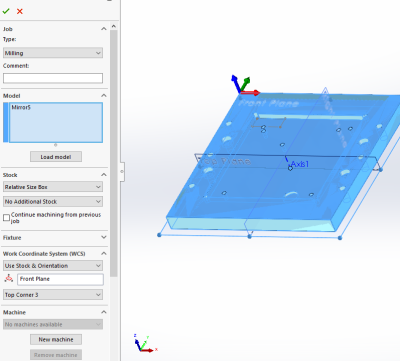
- Select “New Job” to specify desired part to machine, define size of raw stock, and indicate the part zero and work holding coordinate system.

- Typically the back left corner is used for part zero as shown
- Select the first desired machining operation from the 2D or 3D machining drop down
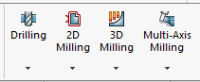
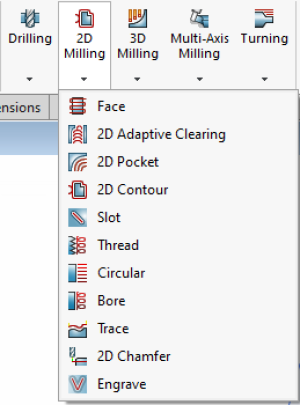
- The 2D machining drop down is used for many 2D operations including slotting, facing, pocketing, and chamfering
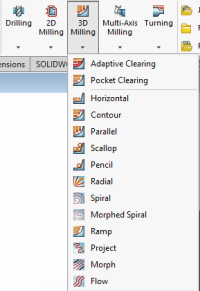
- The 3D operations can do 2D machining operations such as adaptive pocket clearing, however it is typically used for adaptive clearing or machining requiring all 3 axis simultaneously
- 2D and 3D operations require many of the same input perimeters including
- Tool and cutting rate
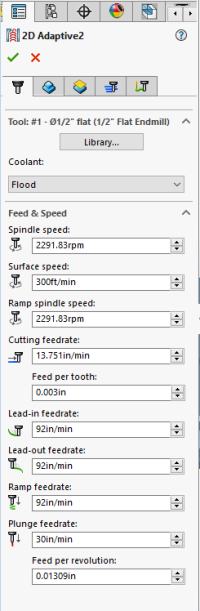
- Tools can be selected from the “all” category of the tool library based on desired tool and modified using the edit button if necessary to set number


